 <\/p>\n
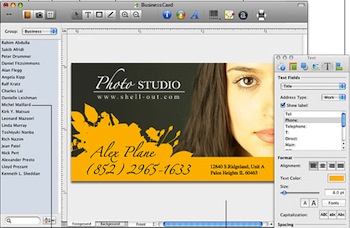
The name of this little Mac-only software program might sound cheesy, but it does exactly what it says, and a lot better than you might expect. It helps you create professional business cards really quickly and easily. And it has been around for a few years\/versions, so the UI is mature, stable, and elegant. And EASY. <\/p>\n
<\/p>\n
You just drag stuff into the card area and they just work. Guide lines appear right when and where you’d expect them without having to work with extra commands. When you’re done, you simply click Export and a PDF appears – with cut marks for the printers, if you want – and you can then hand the PDF file directly to a professional printer to work off of. <\/p>\n
I’ve used this any time I’ve needed to make business cards and it works flawlessly. They have some links within the program to help you find printers, but I don’t bother with that feature- I just hand the PDF to the printer that I know and trust. The whole process is so much easier than working with InDesign or some other design tool not made for business cards.<\/p>\n
No-nonsense business card creator<\/p>\n","protected":false},"author":4,"featured_media":0,"comment_status":"open","ping_status":"closed","sticky":false,"template":"","format":"standard","meta":{"_mi_skip_tracking":false},"categories":[46],"tags":[],"acf":[],"_links":{"self":[{"href":"https:\/\/tkdev.kk.org\/cooltools\/wp-json\/wp\/v2\/posts\/4649"}],"collection":[{"href":"https:\/\/tkdev.kk.org\/cooltools\/wp-json\/wp\/v2\/posts"}],"about":[{"href":"https:\/\/tkdev.kk.org\/cooltools\/wp-json\/wp\/v2\/types\/post"}],"author":[{"embeddable":true,"href":"https:\/\/tkdev.kk.org\/cooltools\/wp-json\/wp\/v2\/users\/4"}],"replies":[{"embeddable":true,"href":"https:\/\/tkdev.kk.org\/cooltools\/wp-json\/wp\/v2\/comments?post=4649"}],"version-history":[{"count":1,"href":"https:\/\/tkdev.kk.org\/cooltools\/wp-json\/wp\/v2\/posts\/4649\/revisions"}],"predecessor-version":[{"id":10676,"href":"https:\/\/tkdev.kk.org\/cooltools\/wp-json\/wp\/v2\/posts\/4649\/revisions\/10676"}],"wp:attachment":[{"href":"https:\/\/tkdev.kk.org\/cooltools\/wp-json\/wp\/v2\/media?parent=4649"}],"wp:term":[{"taxonomy":"category","embeddable":true,"href":"https:\/\/tkdev.kk.org\/cooltools\/wp-json\/wp\/v2\/categories?post=4649"},{"taxonomy":"post_tag","embeddable":true,"href":"https:\/\/tkdev.kk.org\/cooltools\/wp-json\/wp\/v2\/tags?post=4649"}],"curies":[{"name":"wp","href":"https:\/\/api.w.org\/{rel}","templated":true}]}}